


HuntSmart: The Trail Cam App
4.41.08K Reviews
App Specs
- Version
- 3.8.6
- Updated On
- License
- Free
- Downloads
- 100,000+
- Developer
- GSM Outdoors
- Categories
- Sports
- Platform
- Android
Screenshots
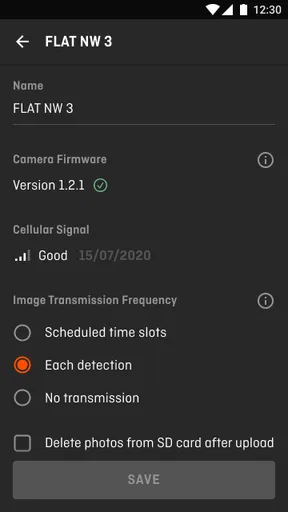
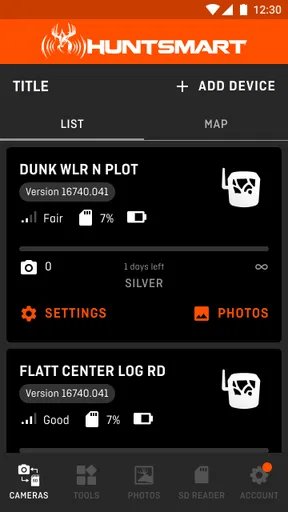
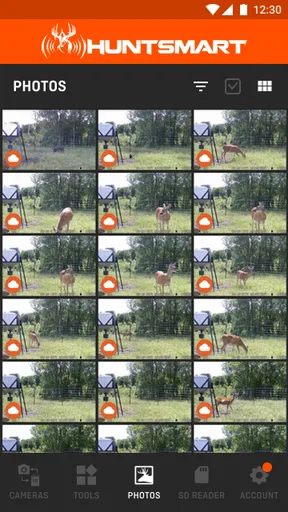
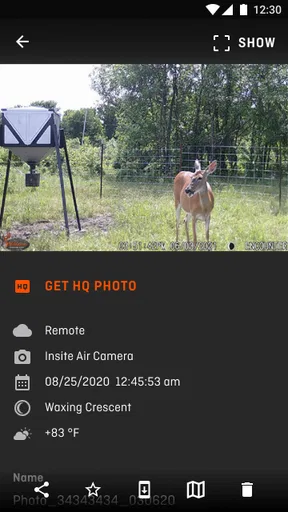
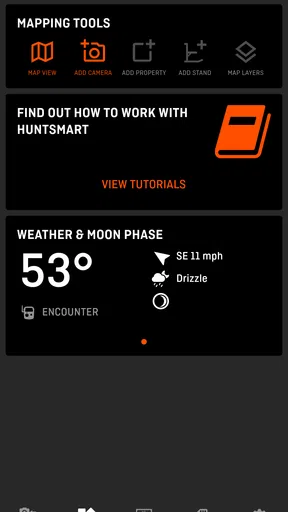
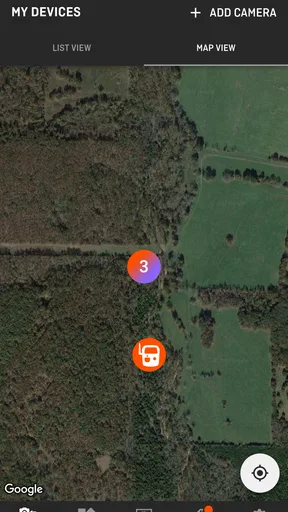
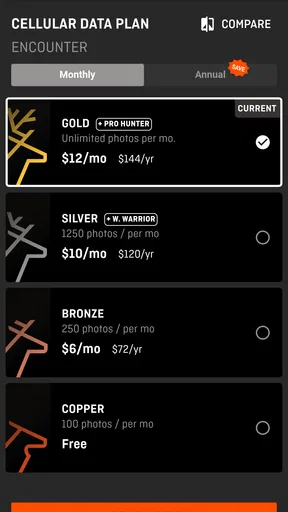
 Analysis by AppCompare
When I think about trail-camera apps, I do not judge them only by whether they look modern or show a few attractive images. The real test is whether the app helps me make sense of field activity without creating extra uncertainty around accounts, data, or day-to-day use. HuntSmart is built for that practical part of hunting: connecting the experience of a trail camera with a mobile screen so I can check activity and make decisions without treating every camera visit as a separate chore.
That focus makes it a more interesting sports app than a simple photo viewer. The useful question is not just whether I can see an image, but whether the app fits the way I actually prepare, monitor, and review a hunting area. In my experience, the best value comes when I use it as part of a repeatable routine rather than opening it once in a while out of curiosity.
HuntSmart is developed by GSM Outdoors and is available free of charge. It is rated for Everyone, which makes the basic audience broad, although the subject matter is clearly aimed at hunters and people managing trail cameras. The app has been available since July 27, 2020, and its current version is 3.8.6 for devices running Android 8.0 or later. That gives it a fairly established presence rather than the feel of a brand-new experiment.
How HuntSmart fits into a real trail-camera routine
I find HuntSmart most useful when it has a clear place in my trail-camera routine, rather than becoming another app I check whenever I have a spare moment. I would use a planned review to decide what needs attention, then carry those questions into the next camera visit. That practical baseline also makes it easier to see which setup choices are worth checking before relying on the app.
More useful when checking patterns than when chasing single images
The first thing I would tell a new user is to think in terms of patterns. A trail camera produces individual moments, but hunting decisions usually depend on repeated activity: when animals appear, which locations stay active, and whether a change in weather, food, cover, or human movement seems to alter behavior. An app like HuntSmart becomes valuable when it reduces the friction between collecting those moments and reviewing them.
A realistic scenario is a weekend check before a planned hunt. Instead of waiting until I am physically near every camera, I can use the app as the place where I review what deserves attention first. If one location has recent activity and another has gone quiet, I can spend my limited preparation time on the more promising area. That does not replace judgment in the field, but it can help me avoid treating every camera location as equally important.
I also find this kind of workflow helpful after a hunt. It is easy to remember the exciting image and forget the ordinary ones, yet the ordinary images often reveal the more useful rhythm. Reviewing camera activity separately from the excitement of being outdoors encourages a calmer decision process. I can ask whether a location is consistently active instead of letting one unusual capture dictate the entire plan.
Worth Reading Before You Choose

Flipboard Shows What News Apps Must Do Beyond the Feed

Switching to Android Auto Means Rethinking Your Driving Routine

Google Calendar Makes a Crowded Week Easier to Manage

Ludo King Makes the Most of the Minutes Between Plans

Baby Panda World Brings Quick Play to Modern Phones, but Its Game Library Feels Busy

ESPN’s Live Game View Makes Following Close Games Easier
The app is aimed at connected fieldwork, not general sports tracking
HuntSmart belongs in the hunting side of the sports category, not alongside running logs, fitness dashboards, or scorekeeping tools. Its purpose is narrow, and that is a strength if trail cameras are already part of my setup. I would not install it expecting training plans, weather coaching, mapping lessons, or a broad outdoor community. The app makes the most sense for someone who wants a mobile companion for trail-camera work.
That specialization also affects who should skip it. If I do not own or use compatible trail-camera equipment, there is little reason to choose HuntSmart over a general photo-management app. Likewise, a hunter who prefers to handle every image manually on a computer may not gain enough from adding another mobile workflow. The app is most convincing when convenience between field visits matters.
What I would organize before relying on it
My advice is to decide on a simple naming and review system before the camera library becomes crowded. Use names that describe location rather than vague labels, and keep a short note about why each camera matters. That small habit improves the value of later reviews because I am not trying to remember which “north” or “back” camera I meant several weeks earlier.
I would also separate observation from interpretation. An image showing an animal does not automatically prove that a location is the best place to hunt. I would record what appeared, when it appeared, and how often similar activity occurred before changing a setup. The app can make access to trail-camera information easier, but it cannot remove the need for responsible judgment.
Trust begins with what the app visibly asks me to do
For me, trust in a field app starts with the moments where it asks for attention: signing in, connecting equipment, allowing access, or choosing whether to share something. Those moments matter more than polished screens because they determine how much control I have over the information I place in the service. I pay attention to whether a choice is understandable and whether I can tell what action I am confirming.
With HuntSmart, I would approach setup deliberately rather than tapping through every screen. I would read each permission prompt in context, connect only the equipment I intend to use, and avoid treating optional-looking choices as automatic requirements. This is not a criticism of the app; it is a sensible habit for any camera-related service, especially when images and location-related hunting information may be personally sensitive.
The app’s public positioning as a trail-camera companion gives me a clear reason for using it, but a clear purpose is not the same as unlimited trust. I still want to know what is being requested at each step and whether the account settings let me manage those choices later. That distinction is important: usefulness may get me through installation, while visible controls determine whether I remain comfortable using the app over time.
Account control matters more than a quick first launch
A smooth first launch is nice, but I care more about what happens when my circumstances change. I might replace a phone, stop using one camera, share a hunting property, or decide that I no longer want a particular connection active. Those are the moments when an app’s account controls become meaningful.
My practical approach is to review the account and connected-device areas after setup, not months later. I would look for ways to update basic account details, remove equipment that is no longer in use, and understand which choices are reversible. If another person needs access, I would prefer a clearly defined account arrangement over casually sharing my own login. That protects both convenience and accountability.
I also recommend keeping the app updated through the normal operating-system store process. HuntSmart’s current version is 3.8.6, and using the current release is generally the sensible way to receive available fixes and compatibility improvements. I would still check the app after an update, particularly if a camera connection or notification behavior is important to a planned trip.
Data-sensitive moments deserve extra care
Trail-camera images can feel harmless, but the surrounding context may reveal more than a picture. A timestamp, a recognizable property feature, a camera label, or a repeated activity pattern can expose information about a hunting area. That is why I would treat camera content as more sensitive than ordinary vacation photos, even when the image itself does not show anything obviously private.
Before sharing screenshots, I would inspect them for labels, coordinates, recognizable landmarks, and other details that identify a location. I would also avoid forwarding account invitations or images to people who do not need them. The app may make information easier to review, but convenience can also make accidental sharing easier if I am not careful.
This is especially relevant when a family member, hunting partner, or land manager uses the same information. I would agree in advance about who should see camera activity and which parts of the setup should remain private. A simple conversation can prevent confusion later, particularly when several people are making decisions based on the same images.
Notifications can help, but they should not run the whole hunt
Alerts are useful when they reduce unnecessary checking, yet they can also turn every new capture into an interruption. My preference is to use notifications as prompts for review rather than as automatic instructions. A new image can tell me that something happened; it cannot, by itself, tell me whether I should change a plan immediately.
If notifications become noisy, I would adjust the phone’s notification settings or the app’s available preferences instead of abandoning the entire workflow. I would rather review activity at planned times and reserve urgent attention for situations that genuinely matter. This approach also reduces the chance that I make a rushed decision based on one image.
The trade-off is straightforward. More alerts may provide a stronger sense of immediacy, while fewer alerts create a calmer and more deliberate routine. HuntSmart is more useful when I choose the balance intentionally instead of allowing the default behavior to decide how often I think about the cameras.
Where it compares well with familiar alternatives
The usual alternative is a manual process: visit the camera, remove or inspect its storage, sort images elsewhere, and remember the results in notes or in my head. That method can work, and it may suit someone who wants maximum separation between equipment and online services. Its weakness is that it makes comparison slower and encourages long gaps between checks.
Another alternative is using a camera maker’s own companion app. That may be the better choice when a person wants the tightest possible relationship with one brand’s hardware and does not need a broader hunting workflow. HuntSmart is more appealing when its trail-camera approach matches the way I manage activity across my outdoor routine, but I would not assume that one app is automatically best for every camera owner.
A third option is a general cloud photo service. That can be convenient for storing images, but it usually does not reflect the way hunters think about camera locations and field decisions. A general gallery may show pictures effectively while offering less context for reviewing a hunting setup. HuntSmart’s advantage is its specific purpose; its limitation is that it is not meant to replace a full personal archive, editing suite, or general photo backup system.
Three habits that make the app more useful
Review in batches instead of reacting to every capture. I would choose a regular review window, compare activity across locations, and note changes that remain noticeable over time. This keeps a single surprising image from dominating my judgment.
Keep location information intentionally vague when sharing. Before sending an image to a group chat, I would crop or hide labels and inspect the background. This is a small step, but it protects information that may matter more than the image itself.
Use a connection checklist after changing equipment. When replacing a camera or phone, I would verify the account, the intended device, notification behavior, and privacy choices before leaving the setup unattended. A checklist prevents a forgotten old connection from becoming a surprise later.
These habits are not flashy features, but they are where I see the practical difference between merely installing HuntSmart and actually building a dependable process around it. The app can centralize access, while the user still needs to decide how information is reviewed, protected, and acted upon.
Who will appreciate it most
I think HuntSmart is a good fit for a hunter who checks trail-camera activity regularly, values mobile access, and wants to make field preparation less dependent on physically visiting every camera first. It is also suitable for someone who prefers a focused hunting tool rather than assembling a workflow from a generic gallery, notes app, and manual file transfer.
The audience size suggests that it has found a meaningful user base: the app has more than one hundred thousand installs, an average rating of 4.4 from around 6.6 thousand ratings, and roughly 1.1 thousand written reviews. I treat those numbers as useful context rather than proof that every setup will feel identical. Hardware, connectivity, account habits, and personal expectations can still shape the experience.
The Everyone age rating is reassuring for households where the app may be visible on a shared device, but it should not be confused with a guarantee that every hunting-related situation is suitable for every person. Parents and account owners should still decide how images and location information are handled. The rating describes the app’s content classification, not the judgment required when using field data.
Who should choose another approach
I would look elsewhere if my priority were a general outdoor navigation tool, a complete wildlife journal, or a sophisticated photo archive. HuntSmart’s focused purpose is valuable only when it matches the problem I am trying to solve. Adding it to a workflow that does not involve trail cameras would create more setup than benefit.
I would also consider a manufacturer-specific alternative if my equipment depends heavily on features that are tightly integrated with one hardware brand. In that situation, the most convenient app may be the one that exposes every device-specific option in the clearest way. HuntSmart should be judged by how well it supports my actual camera routine, not by the assumption that a dedicated app is always superior.
Finally, people who are uncomfortable with accounts, connected devices, or cloud-based review should pause before committing to this kind of workflow. Manual inspection may be slower, but it can feel more transparent to someone who wants fewer moving parts. The right choice depends on whether mobile convenience outweighs that preference.
My cautious verdict on HuntSmart
After looking at HuntSmart as both a hunting companion and a service that may handle sensitive field information, I see a focused app with a clear reason to exist. It can make trail-camera review more practical, especially when I use it to compare activity, prioritize visits, and maintain a consistent routine. The free price lowers the barrier to trying it, and the established release history gives it a more settled feel than a newly launched tool.
My recommendation comes with one condition: use it deliberately. Check what the app asks for, review account and device controls, think before sharing images, and avoid treating alerts as automatic hunting advice. Those steps do not take away from the convenience; they make the convenience safer and more useful.
My bottom line is that HuntSmart is worth trying for active trail-camera users who want a focused mobile workflow, but it is not a universal replacement for every camera brand’s app or for a private manual system. I would recommend it to a friend who regularly manages camera activity and wants less friction between the field and the phone. I would not recommend installing it simply because it is a sports app, nor would I promise that it removes every equipment or connectivity concern. Its strongest quality is its specific purpose, and that same focus is the reason some users will find another option better.
Pros
- Remote access lets you check trail-camera photos without visiting the site.
- Organizes captures by camera
- date
- and location for easier wildlife monitoring.
- Useful image filters help separate animals from empty or triggered frames.
- Supports scouting patterns over time with a convenient photo history.
- Can reduce unnecessary trips when cameras are placed in remote areas.
Cons
- Requires compatible trail-camera hardware and a reliable cellular connection.
- Cloud storage or advanced features may require a paid subscription.
- Remote image uploads can consume significant camera data and battery.
- Initial camera pairing and setup may take time for less technical users.
- Wildlife alerts can produce false positives from people
- weather
- or moving vegetation.
FAQs for HuntSmart: The Trail Cam App
What is HuntSmart: The Trail Cam App used for?
HuntSmart is designed to help hunters and outdoor enthusiasts organize, monitor, and review trail-camera activity from a mobile device. Depending on the compatible camera setup, users can receive or manage wildlife photos and videos, identify patterns in animal movement, and keep useful observations in one place. It is best viewed as a scouting and management companion rather than a replacement for responsible field preparation or local hunting knowledge.
Does HuntSmart work with every trail camera?
No. Compatibility can depend on the camera brand, model, connection method, and the services supported by the application. Before downloading, check HuntSmart’s current compatibility list and confirm whether your camera requires a specific subscription, cellular plan, account, or hardware configuration. A camera may still function independently, but its images and controls might not be available through the app if it is unsupported.
Does HuntSmart require an internet connection or cellular service?
Most connected trail-camera features require some form of internet or cellular communication. Receiving new images, synchronizing camera data, viewing cloud content, and changing remote settings may not work without a reliable connection. The app itself may allow limited access to previously downloaded information while offline, but performance will vary. Remote locations, weak signals, and service interruptions can delay uploads and notifications.
Is HuntSmart free to download, and are there additional costs?
The app may be available to download without an upfront charge, but the total cost of using HuntSmart can depend on the connected camera and the services attached to it. Cellular data plans, cloud storage, premium tools, camera activation, or subscription features may cost extra. Review the in-app purchase details and the camera provider’s plan terms carefully so you understand recurring fees before setting up your equipment.
Is HuntSmart suitable for beginners, and what should new users know?
HuntSmart can be useful for beginners because it brings camera activity, wildlife observations, and scouting information into a more convenient mobile workflow. However, new users should expect to spend time pairing equipment, configuring notifications, learning image-management tools, and adjusting camera settings for their property. Accurate results also depend on camera placement, battery life, signal strength, and following applicable wildlife and hunting regulations.


